TrueRental User Guide
TrueRental is a desktop application for managing your clients' details, optimized for use via a Command Line
Interface (CLI) while still having the benefits of a Graphical User Interface (GUI).
TrueRental prioritises productivity and efficiency.
TrueRental can get your client management tasks done much faster than traditional GUI apps, due to minimal mouse movements and distractions.
Our application allows you to perform multiple operations that suits your needs as a letting agent, such as:
- Adding new clients
- Updating existing clients
- Removing outdated clients
- Finding clients who match a criteria
- Import and export client details
This project is built on top of AddressBook-Level3 Project. Special thanks and appreciation for the team of AddressBook-Level 3.
Table of Contents
Quick Start
Ensure you have Java
17or above installed in your Computer.Download the latest
.jarfile from here.Copy the file to the folder you want to use as the home folder for your TrueRental application.
Open a command terminal, navigate into the folder you put the jar file in using the command
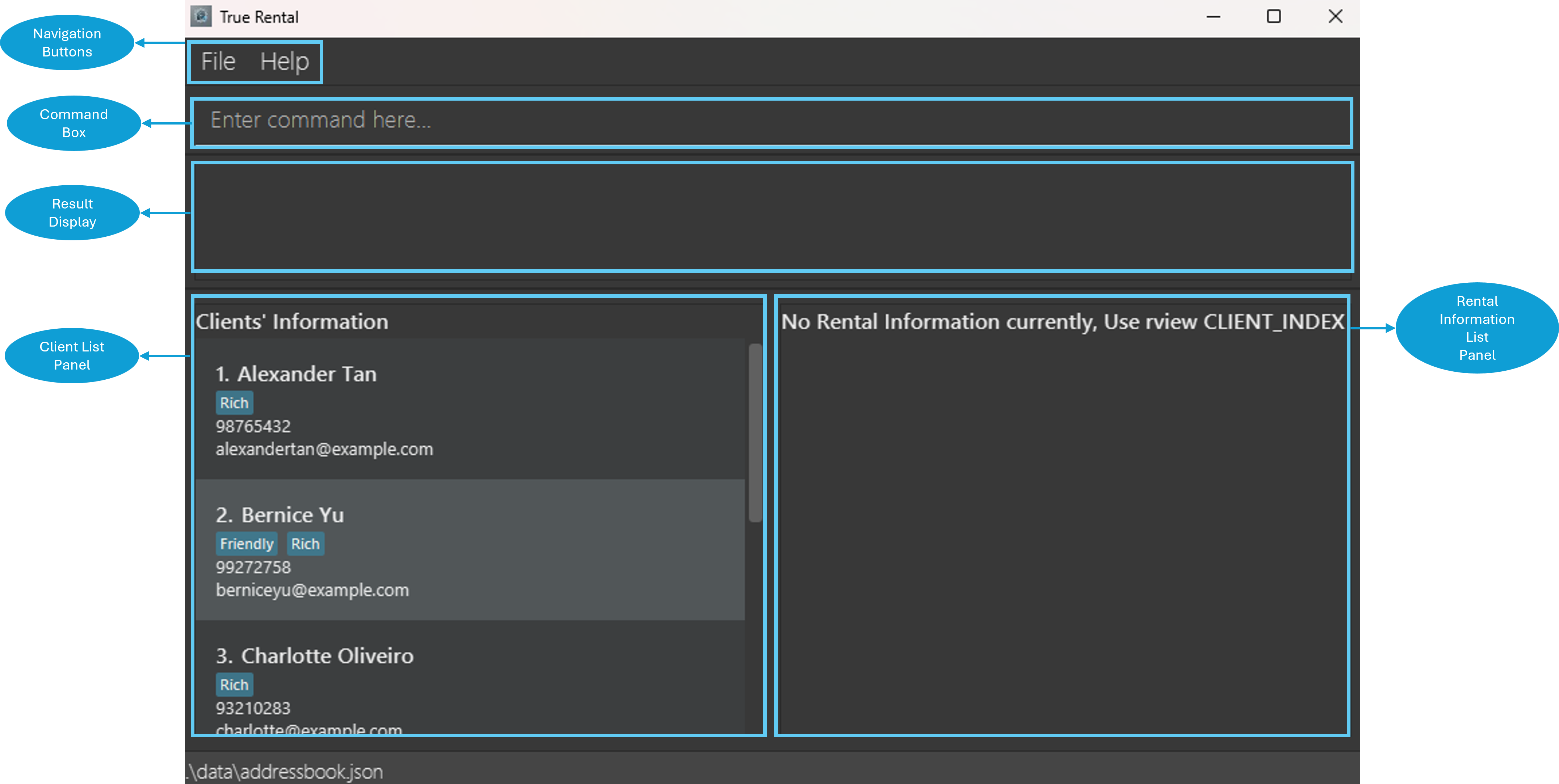
cd, and use thejava -jar truerental.jarcommand to run the application.Note: A GUI similar to the image below should appear in a few seconds. The image below consists of sample data.
Type the command in the command box and press
Enterto execute it. E.g. Typinghelpin the command box and pressingEnterwill open the help window.Simple and Quick Tutorial:
cadd n/Steven Tan e/steventan@tutorial.com p/98765432: Adds a client namedSteven Tanwith emailsteventan@tutorial.comand phone number98765432.list: Lists all clients. There should be 6 clients listed within the TrueRental application.cdelete 3: Deletes the 3rd client shown in the current list, namedCharlotte Oliveiro.
Entery: Yes for confirmation to the operation.clear: Deletes every client and their associated rental information.
Entery: Yes for confirmation to the operation.exit: Exits the application.
Refer to Command Summary for a quick overview of available commands.
Refer to Features for details of each command.

Important Notes
Notes about command format:
Commands are case-sensitive and should always be lowercase.
E.g.help,cadd,cedit,list.Words in
UPPER_CASEare the parameters to be supplied by the user.
E.g. incadd n/NAME,NAMEis a parameter which can be used asadd n/John Doe.Items without brackets are mandatory, you must provide a value.
E.g.n/NAMEforcadd,CLIENT_INDEXanda/ADDRESSforradd.Items in square brackets
[]are mandatory to have at least one of them, you should not omit all of them in a command.
E.gceditcan be used ascedit 1 n/Steven Tan e/steventan@abc.com p/98765432orcedit 1 n/Steven Tan p/98765432.Items in curly brackets
{}are optional, you may choose not to have them in your command.
E.g.raddcan be used asradd 1 a/140 Robinson Road, #03-05, Chow Houseorradd 1 a/140 Robinson Road, #03-05, Chow House m/3200 dd/10 d/0.Items with
... after them can be used multiple times.
E.g.k/KEYWORDSforfindcan be used asfind k/Steven Tan k/98765432(2 times),find k/98765432(1 time), etc.Parameters can be in any order.
E.g. if the command specifiesn/NAME p/PHONE_NUMBER,p/PHONE_NUMBER n/NAMEis also acceptable.There should be minimally one whitespace between every parameter option flag
E.g.n/James Tan e/jamestan@example.com.Extraneous parameters for commands that do not take in parameters (such as
help,list,exit,sortandclear) will be ignored.
E.g. if the command specifieshelp 123, it will be interpreted ashelp.Some commands will prompt for confirmation. Inputting
yoryescounts as confirmation, and any other input counts as cancellation.If you are using a PDF version of this document, be careful when copying and pasting commands that span multiple lines as space characters surrounding line-breaks may be omitted when copied over to the application.
Notes about this user guide:
- Please refer to this user guide whenever you feel something is wrong with the application to determine whether it is a genuine problem.
- If you are a more technical or experienced user, feel free to check out our Developer Guide for detailed technical information about TrueRental.
- The client referred to in this user guide is the property owner or landlord who has engaged you to manage their property.
- The rental information referred to in this user guide consists of the details of the property being rented, including key information for example address, rental start date, and other relevant property details.
- The customer (as part of the rental information) referred to in this user guide is the tenant of the property owned by the client.
- Monthly rent is equivalent to monthly rent amount.
- Both are referring to the monthly rent amount for the property owned by your client.
- Deposit is equivalent to deposit amount.
- Both are referring to the security deposit amount for the property owned by your client, paid by the tenant at the start of the lease.
- Customer list is equivalent to customers.
- Both are referring to the list of tenant(s) for the property owned by your client.
- Rent due date is equivalent to rental monthly payment date.
- Both are referring to the specific date (of the month) on which the rent payment is due for the property owned by your client.
Command Summary
Tip: Refer to respective features within Features for a better understanding of each command.
| Commands | Description | Format | Examples |
|---|---|---|---|
| help | Show manual | help | - |
| cadd | Add a client | cadd n/NAME [p/PHONE_NUMBER] [e/EMAIL] {t/TAG...} | cadd n/Steven Tan e/steventan@abc.com p/98765432 |
| radd | Add rental information to a client | radd CLIENT_INDEX a/ADDRESS {s/RENTAL_START_DATE} {e/RENTAL_END_DATE} {dd/RENT_DUE_DATE} {m/MONTHLY_RENT} {d/DEPOSIT} {cl/CUSTOMER_LIST} | radd 1 a/Blk 26 Defu Lane 10 #01-190 e/31/10/2024 m/2350 dd/15 |
| list | List all clients | list | - |
| rview | View rental information of a client | rview CLIENT_INDEX | rview 1 |
| cedit | Edit a client | cedit CLIENT_INDEX [n/NAME] [p/PHONE_NUMBER] [e/EMAIL] [t/TAG...] | cedit 1 n/Steven Tan e/steventan@abc.com p/98765432 |
| redit | Edit rental information for a client | redit CLIENT_INDEX r/RENTAL_INDEX [a/ADDRESS] [s/RENTAL_START_DATE] [e/RENTAL_END_DATE] [dd/RENT_DUE_DATE] [m/MONTHLY_RENT] [d/DEPOSIT] [cl/CUSTOMER_LIST] | redit 1 r/1 a/10 North Bridge Rd #02-5125 m/3000 d/0 |
| find | Find information | find [k/KEYWORDS...] [n/NAME...] [p/PHONE_NUMBER...] [e/EMAIL...] [t/TAG...] | find k/Tan n/Steven Tan p/98765432 |
| cdelete | Delete a client | cdelete CLIENT_INDEX | cdelete 3 |
| rdelete | Delete rental information from a client | rdelete c/CLIENT_INDEX r/RENTAL_INDEX | rdelete c/1 r/2 |
| sort | Sort clients by name | sort | - |
| ↑up↓down arrow keys | Navigate command history | ↑ up-arrow key and ↓ down-arrow key | - |
| ↹ Tab key | Autofill value | ↹ Tab key | - |
| import | Import data from an external file | import | - |
| export | Export all TrueRental's data | export | - |
| clear | Clear all clients' details | clear | - |
| exit | Exit the application | exit | - |
Parameter Constraints Table
| Parameter name | Description | Constraints | Examples |
|---|---|---|---|
NAME | The client's name. | The value of NAME can consist of only Alphanumeric combinations of Unicode characters, with a minimum length of one character. | Jason 1 Lee, Phua Chu Kang 2, 123456789 |
PHONE_NUMBER | The client's phone number. | The value of PHONE_NUMBER can consist of at least 3 numeric characters without spaces. | 999, 98123333, 123123 |
EMAIL | The client's email address. | The value of EMAIL can consist of two segments delimited by @ such as the format local-part@domain. First segment, local-part, to include Alphanumeric with optionally +_.- characters. The local-part may not start or end with any Special characters. Second segment, domain, is made up of domain labels separated by periods. 1. The domain name must end with a domain label at least 2 characters long, 2. The domain name must have each domain label start and end with Alphanumeric characters. 3. The domain name must have each domain label consist of Alphanumeric characters, separated only by hyphens, if any. | jasonlee@example.com, user.name+tag@example.com, user-name@123 |
TAG | The tags associated with your client. | Only accepts alphanumeric characters without spaces. | FRIENDS, ANNOYING, LOVERBOY |
ADDRESS | The address of the property owned by your client. | The value of ADDRESS can consist of any combination of Unicode characters, with a minimum length of one character. | 59 Ubi Ave 1 #06-05, 18 Upper Boon Keng Road #01-1137 |
RENTAL_START_DATE | The specific date (including day, month, and year) on which the rental period for the property, owned by your client, begins. | The value of RENTAL_START_DATE can be empty (no value is provided after the prefix s/ for the specified command), in which case it will be treated as an unspecified value (—).However, if the value of RENTAL_START_DATE is not empty (a value is provided after the prefix s/ for the specified command), it must adhere to the following conditions:1. It must be in the format dd/mm/yyyy, where dd represents the day, mm represents the month, and yyyy represents the year.2. It must represents a valid date and fall within the range of 01/01/1900 to 31/12/2099.3. If the value of RENTAL_END_DATE is also specified and not empty, then the date represented by the value of RENTAL_START_DATE should be the same date or earlier than the date represented by the value of RENTAL_END_DATE. | 01/01/2024, 01/06/2024 |
RENTAL_END_DATE | The specific date (including day, month, and year) on which the rental period for the property, owned by your client, ends. | The value of RENTAL_END_DATE can be empty (no value is provided after the prefix e/ for the specified command), in which case it will be treated as an unspecified value (—).However, if the value of RENTAL_END_DATE is not empty (a value is provided after the prefix e/ for the specified command), it must adhere to the following conditions:1. It must be in the format dd/mm/yyyy, where dd represents the day, mm represents the month, and yyyy represents the year.2. It must represents a valid date and fall within the range of 01/01/1900 to 31/12/2099.3. If the value of RENTAL_START_DATE is also specified and not empty, then the date represented by the value of RENTAL_END_DATE should be the same date or later than the date represented by the value of RENTAL_START_DATE. | 31/12/2027, 01/02/2026 |
RENT_DUE_DATE | The specific date (of the month) on which the rent payment is due for the property owned by your client. | The value of RENT_DUE_DATE can be empty (no value is provided after the prefix dd/ for the specified command), in which case it will be treated as an unspecified value (—).However, if the value of RENT_DUE_DATE is not empty (a value is provided after the prefix dd/ for the specified command), it must adhere to the following conditions:1. It must be an integer within the range of 1 to 31.2. It must not have leading zeroes (for example, 01 or 001 are not valid). | 1, 15, 30 |
MONTHLY_RENT | The monthly rent amount for the property owned by your client. | The value of MONTHLY_RENT can be empty (no value is provided after the prefix m/ for the specified command), in which case it will be treated as an unspecified value (—).However, if the value of MONTHLY_RENT is not empty (a value is provided after the prefix m/ for the specified command), it must adhere to the following conditions: 1. It must be a number greater than or equal to 0. 2. If it is a decimal, it must have exactly 2 decimal places (for example, 100., 100.0 or 100.001 are not valid).3. It must not have leading zeroes (for example, 0100 or 00100 are not valid). | 1000, 1000.00, 0 |
DEPOSIT | The security deposit amount for the property owned by your client, paid by the tenant at the start of the lease. | The value of DEPOSIT can be empty (no value is provided after the prefix d/ for the specified command), in which case it will be treated as an unspecified value (—).However, if the value of DEPOSIT is not empty (a value is provided after the prefix d/ for the specified command), it must adhere to the following conditions: 1. It must be a number greater than or equal to 0. 2. If it is a decimal, it must have exactly 2 decimal places (for example, 100., 100.0 or 100.001 are not valid).3. It must not have leading zeroes (for example, 0100 or 00100 are not valid). | 2000, 2000.00, 0 |
CUSTOMER_LIST | The list of the tenant(s) for the property owned by your client. | The value of CUSTOMER_LIST can be empty (no value is provided after the prefix cl/ for the specified command), in which case it will be treated as an unspecified value (—).However, if the value of CUSTOMER_LIST is not empty (a value is provided after the prefix cl/ for the specified command), it must adhere to the following conditions:1. It can consist of any combination of Unicode characters.2. It must have a length of at least one character. 3. If it does not contain a ; character (semicolon), it represents the name of a single tenant.4. If it contains the ; character(s) (semicolon), it is treated as a list of tenant names, with each name separated by a ; and name cannot be empty.5. If it contains the ; character(s) (semicolon), ; should not appear at the beginning or end of the value. | David Ng, Steven Ang 2;David Tan, 123, Dexter;Joshua |
CLIENT_INDEX | Client index number on the client list panel | Only accepts Positive Integer (excluding 0) up till the last index shown on the list | 1 |
RENTAL_INDEX | Rental index number on the rental information list panel | Only accepts Positive Integer (excluding 0) up till the last index shown on the list | 1 |
KEYWORD | Keyword to be used to match client's information | The value of KEYWORD can consist of any Alphanumeric, Special characters +_.@-, and spaces with a minimum length of one character. | Jason, 0 |
Additional constraints: For future enhancements and improvements to the parameter constraints, please visit our Developer Guide.
Duplicate Client Detection
A client is only considered as duplicate if and only if all three parameters NAME, PHONE_NUMBER
and EMAIL_ADDRESS are exactly the same (including case sensitivity).
This is to allow the user to have a greater flexibility of manipulating the client's information.
For example: All the clients stated below the initial client are NOT CONSIDERED as duplicates.
An initial client with the name Jason Lee, phone number 91231231 and email address jasonlee@example.com
The following are NOT DUPLICATES of the initial client:
- A client with the name
Jason Lee, phone number99998888and email addressjasonlee@example.com. - A client with the name
Jason Lee, phone number91231231and email addressNOTjasonlee@example.com. - A client with the name
Jason Lee, phone number—and email addressjasonlee@example.com. - A client with the name
Jason Lee, phone number91231231and email address—. - A client with the name
JASON LEE, phone number91231231and email addressjasonlee@example.com.
Note: — signifies an empty parameter without any characters.
The following is a DUPLICATE of the initial client:
- A client with the name:
Jason Lee, phone number:91231231and email addressjasonlee@example.com.
Duplicate Rental Information Detection
Rental information is considered a duplicate if and only if the value of the ADDRESS parameter matches exactly, including case sensitivity.
This is to allow you to have a greater flexibility of manipulating the rental information.
For example:
An initial rental information with the address 201 Bukit Batok Street 21 #10-163, rental start date 01/01/2024 and monthly rent amount 3200. The values for rental end date, rent due date, deposit amount, and customer list are unspecified.
The following are NOT DUPLICATES of the initial rental information:
- Rental information with the address
201 BUKIT BATOK STREET 21 #10-163, rental start date01/01/2024and monthly rent amount3200. The values for rental end date, rent due date, deposit amount, and customer list are unspecified (as—). - Rental information with the address
201 BUKIT Batok Street 21 #10-163, rental start date01/01/2024and monthly rent amount3500. The values for rental end date, rent due date, deposit amount, and customer list are unspecified (as—). - Rental information with the address
201 Bukit BATOK Street 21 #10-163, rental start date01/01/2024, monthly rent amount3200and rental end date31/12/2024. The values for rent due date, deposit amount, and customer list are unspecified (as—). - Rental information with the address
201 BuKiT BaToK StReEt 21 #10-163, rental start date01/01/2024, monthly rent amount3200, rental end date31/12/2024, rent due date10. The values for deposit amount and customer list are unspecified (as—). - Rental information with the address
201 bukit batok street 21 #10-163, rental start date01/06/2024and monthly rent amount3200. The values for rental end date, rent due date, deposit amount, and customer list are unspecified (as—).
The following are DUPLICATES of the initial rental information:
- Rental information with the address
201 Bukit Batok Street 21 #10-163, rental start date01/02/2024and monthly rent amount3300. The values for rental end date, rent due date, deposit amount, and customer list are unspecified. - Rental information with the address
201 Bukit Batok Street 21 #10-163and rental start date01/12/2024. The values for monthly rent amount, rental end date, rent due date, deposit amount, and customer list are unspecified.
Features
Viewing help : help
Displays a message with a link that directs you to the TrueRental website.
Format: help

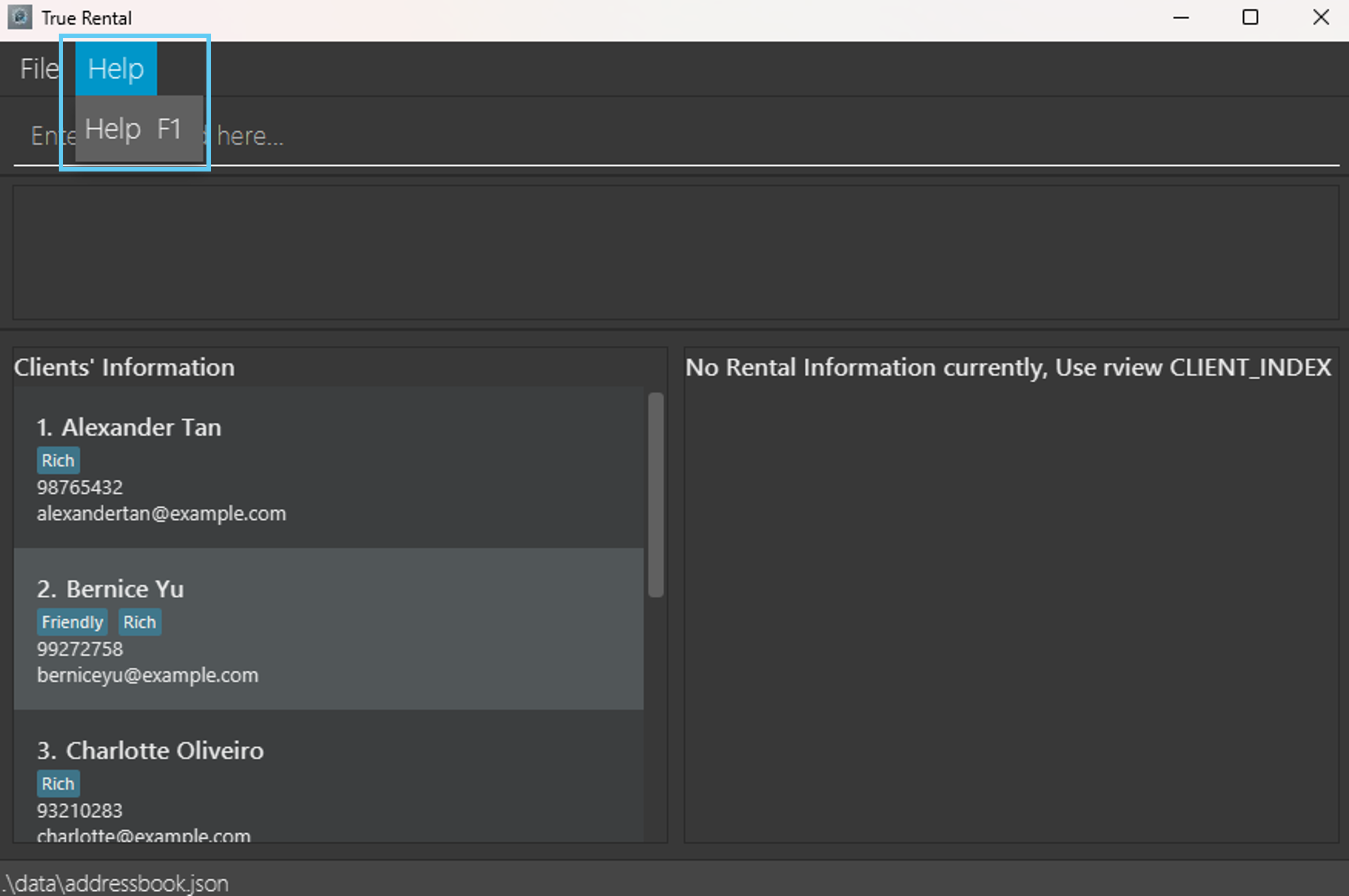
Tip: Alternatively, you can press the button at the top of the navigation button bar to view the help page, or
simply press f1.
Adding a client: cadd
Adds a client to TrueRental.
Format: cadd n/NAME [p/PHONE_NUMBER] [e/EMAIL] {t/TAG...}
Constraints:
- A client must have at least either one phone number or one email address.
Tip:
- A client can have any number of tags, ranging from 0 to infinity.
- A client's name with special characters, such as
Ravi S/O Ramasamywill not be accepted.
Please omit any special characters within the name, such asRavi SO Ramasamy.
Example inputs:
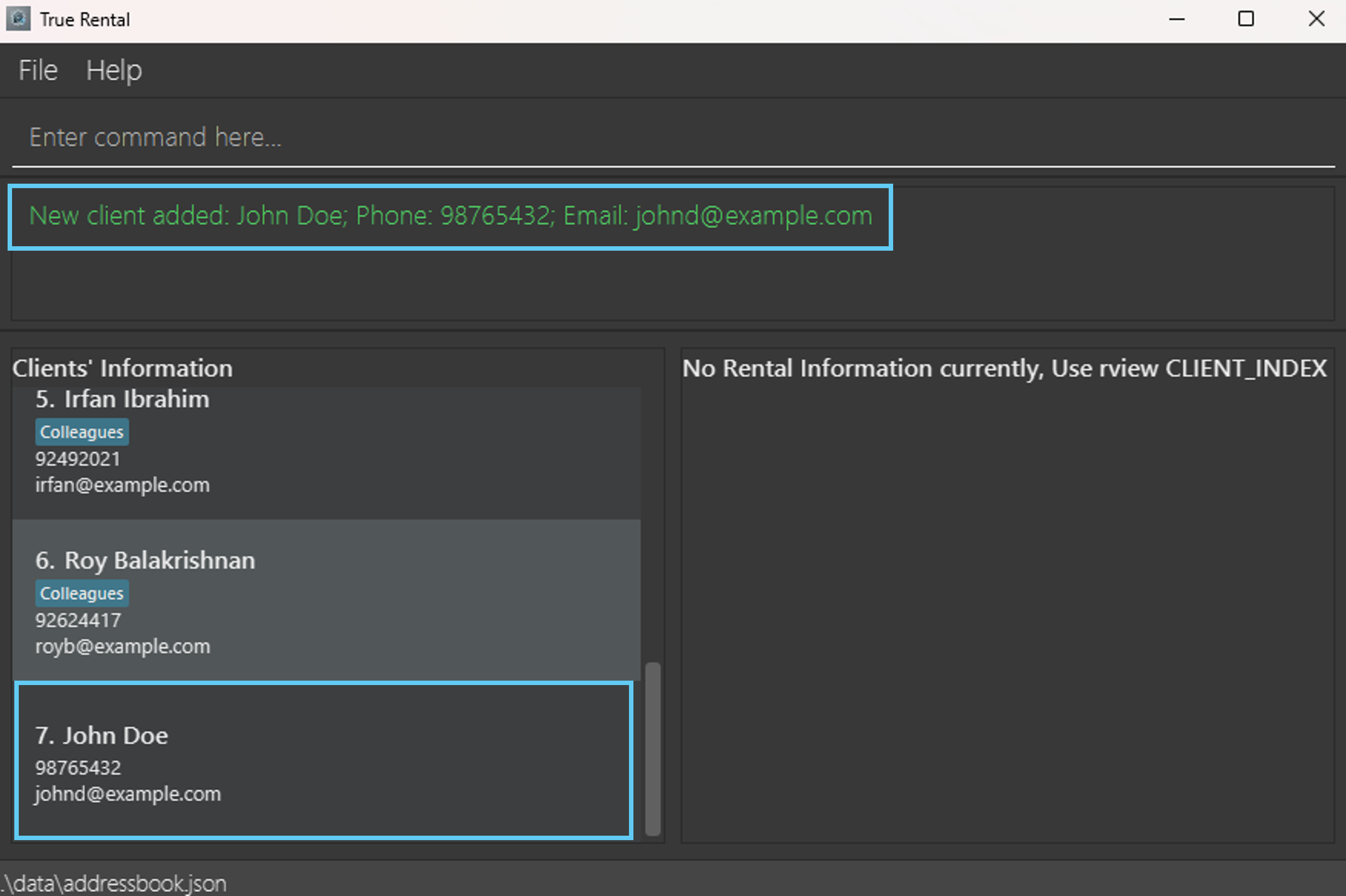
cadd n/John Doe p/98765432 e/johnd@example.comcadd n/Clarice Long e/claricelong@example.comcadd n/Betsy Crowe e/betsycrowe@example.com t/North t/Friend
Example outputs:
New client added: John Doe; Phone: 98765432; Email: johnd@example.comNew client added: Clarice Long; Email: claricelong@example.comNew client added: Betsy Crowe; Email: betsycrowe@example.com; Tags: [Friend][North]
Adding a rental information for a client: radd
Adds a rental information for the specific client to TrueRental.
Format: radd CLIENT_INDEX a/ADDRESS {s/RENTAL_START_DATE} {e/RENTAL_END_DATE} {dd/RENT_DUE_DATE} {m/MONTHLY_RENT} {d/DEPOSIT} {cl/CUSTOMER_LIST}
Constraints:
- The
CLIENT_INDEXrefers to the index number shown in the displayed client list and must be a positive integer starting from 1. - The value of address for the rental information cannot be empty.
Example inputs:
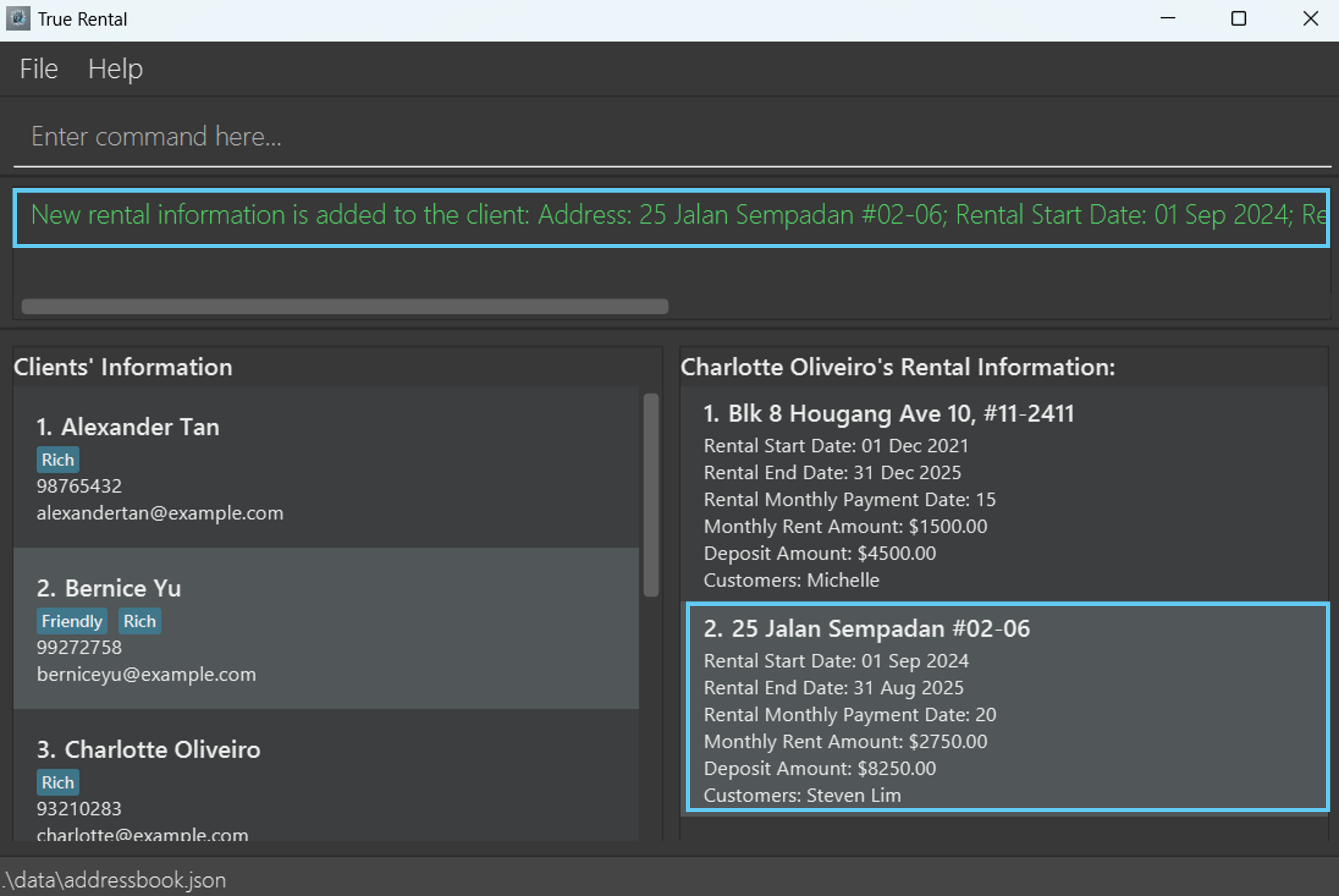
radd 1 a/140 Robinson Road, #03-05, Chow House m/3200 dd/10 d/0radd 1 a/Blk 26 Defu Lane 10 #01-190 e/31/10/2024 m/2350 dd/15 cl/Dominicradd 3 a/25 Jalan Sempadan #02-06 s/01/09/2024 e/31/08/2025 cl/Steven Lim;Jessica dd/20 m/2750 d/8250
Example outputs:
New rental information is added to the client: Address: 140 Robinson Road, #03-05, Chow House; Rental Start Date: —; Rental End Date: —; Rent Due Date: 10; Monthly Rent: $3200.00; Deposit: $0.00; Customer List: —New rental information is added to the client: Address: Blk 26 Defu Lane 10 #01-190; Rental Start Date: —; Rental End Date: 31 Oct 2024; Rent Due Date: 15; Monthly Rent: $2350.00; Deposit: —; Customer List: DominicNew rental information is added to the client: Address: 25 Jalan Sempadan #02-06; Rental Start Date: 01 Sep 2024; Rental End Date: 31 Aug 2025; Rent Due Date: 20; Monthly Rent: $2750.00; Deposit: $8250.00; Customer List: Steven Lim;Jessica
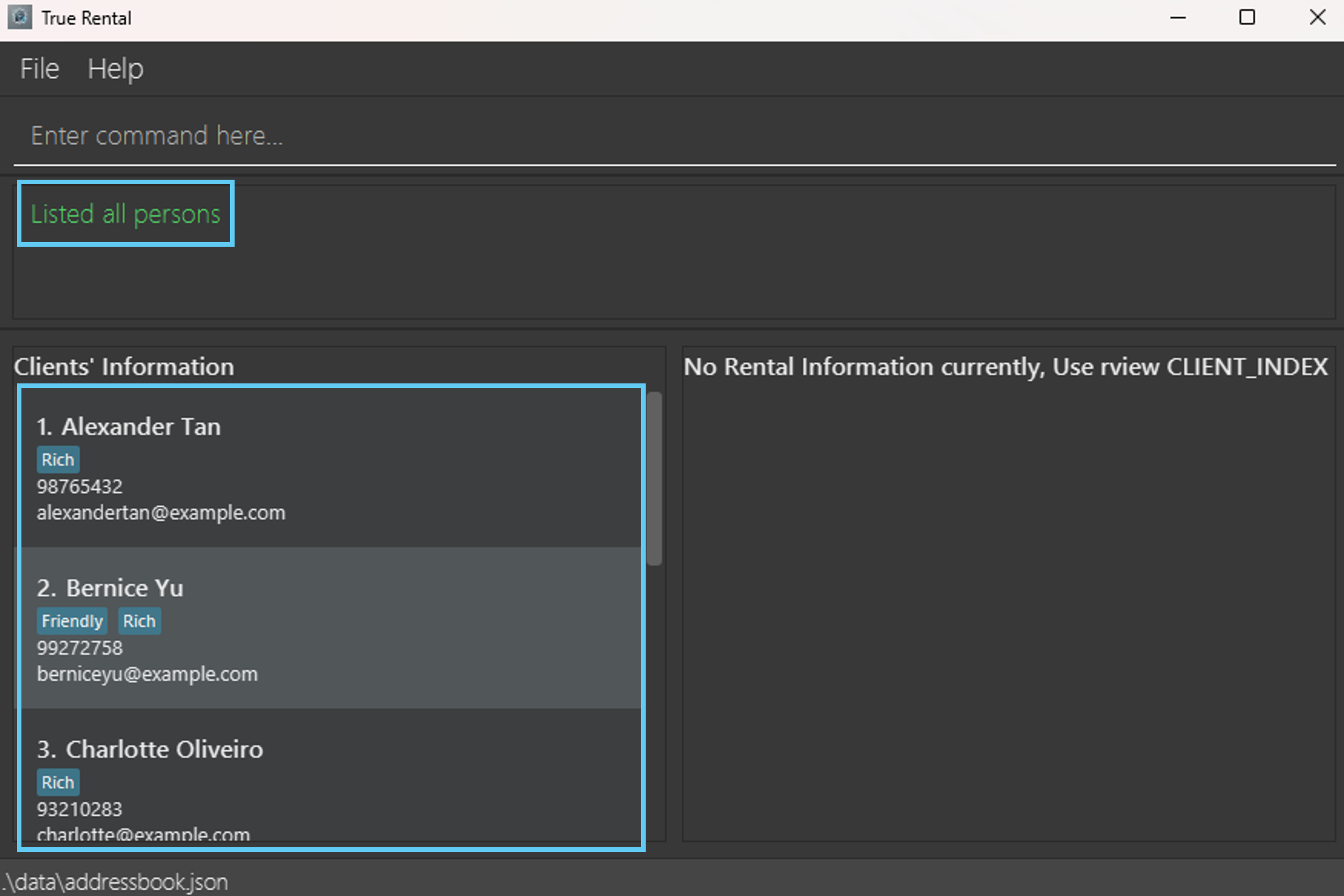
Listing all clients : list
Displays a list of all clients within TrueRental on the Client List Panel.
Format: list
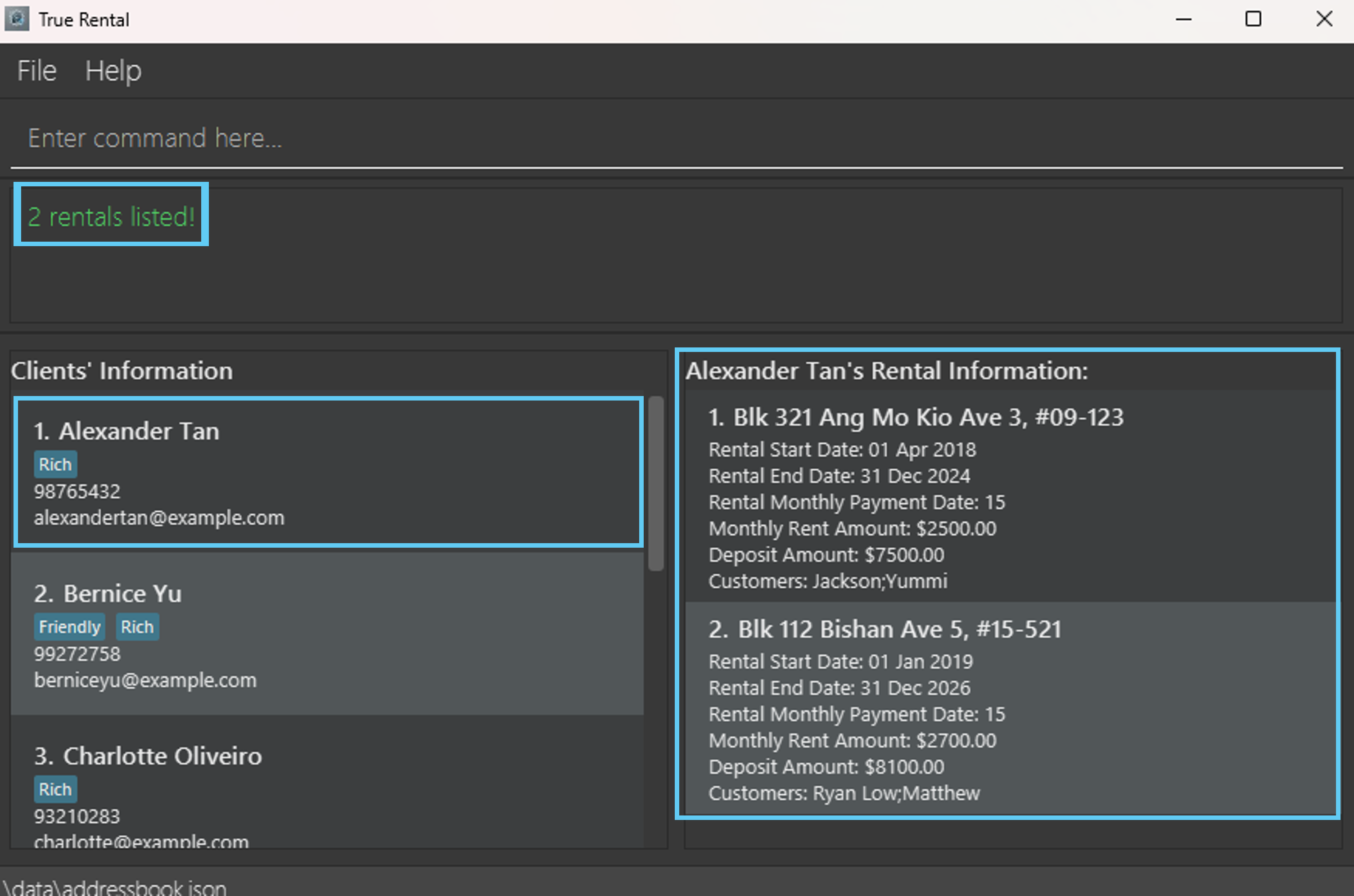
Listing rental information of a client : rview
Displays a list of all rental information related to a specific client within TrueRental.
Format: rview CLIENT_INDEX
Note: Displays all rental information related to the client at the specified CLIENT_INDEX.
Constraints: The CLIENT_INDEX refers to the index number shown in the displayed client list and must be a positive
integer starting from 1.
Example inputs:
rview 1rview 2
Example outputs:
2 rentals listed!, while displaying the updated rental information on the rental information list panel.1 rental listed, while displaying the updated rental information on the rental information list panel.
Editing a client : cedit
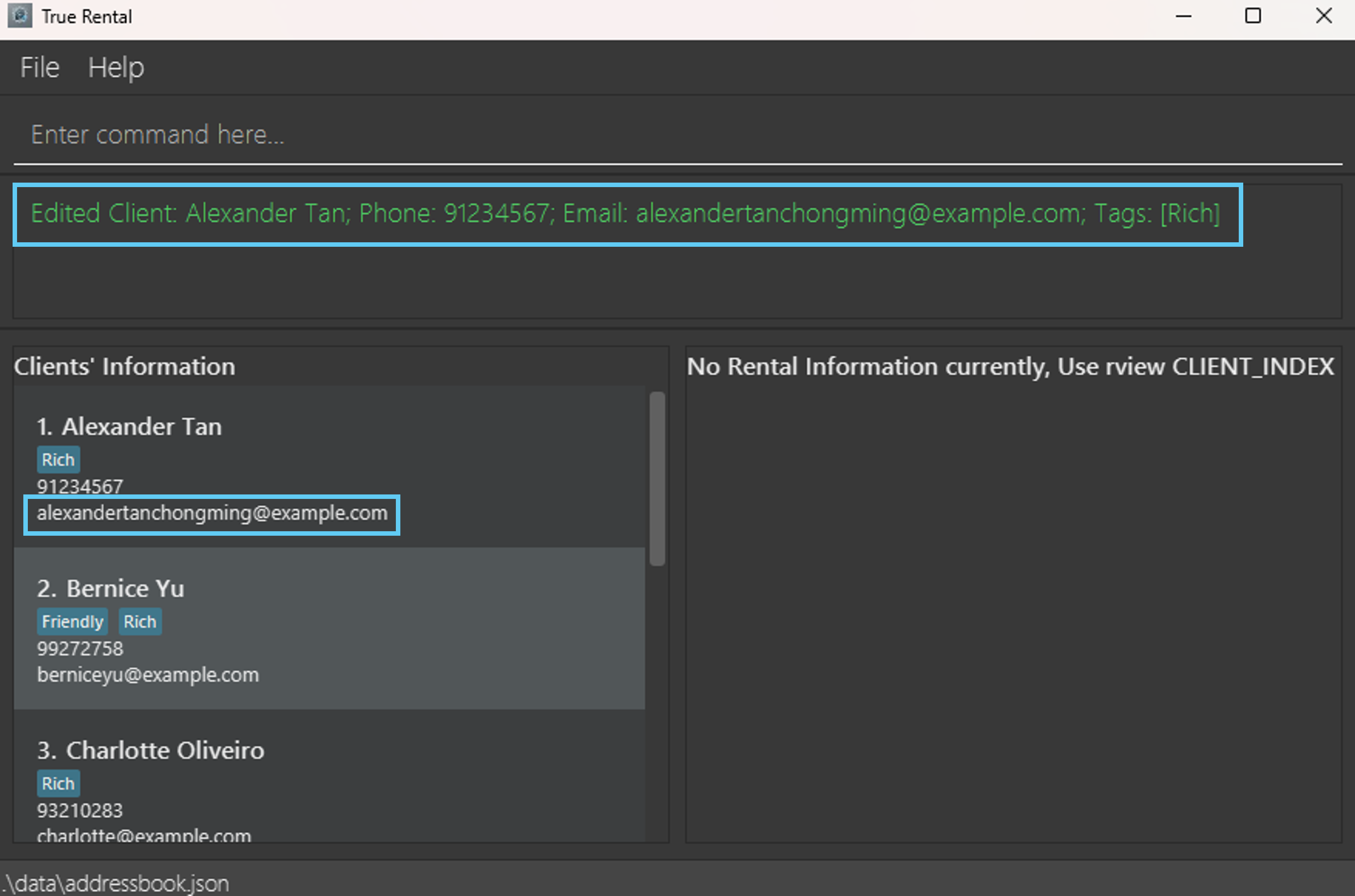
Edits an existing client with TrueRental. The provided input will replace the existing input, subjected to the parameter constraints.
Format: cedit CLIENT_INDEX [n/NAME] [p/PHONE_NUMBER] [e/EMAIL] [t/TAG...]
Constraints:
- The
CLIENT_INDEXrefers to the index shown in the displayed client list and must be a positive number. - The range starts from
1till the last number shown within the list. - A client name cannot be empty.
- A client must have at least either one phone number or one email address.
- A client's
NAME,PHONE_NUMBERandEMAILwill be replaced by the provided value in the command, given that it is not a duplicate. - All the client's existing
TAGs will be removed and replaced by the provided value in the command.
Tip:
- You can remove a client's existing phone number or email address by providing an empty input after
p/ore/respectively. - You can remove all the client's existing tags by providing an empty input after
t/. - A client's name with special characters, such as
Ravi S/O Ramasamywill not be accepted. Please omit any special character within the name such asRavi SO Ramasamy.
Example inputs:
cedit 1 p/91234567 e/alexandertanchongming@example.comcedit 3 n/Chanel Oliveiro t/Rich t/Twincedit 2 p/
Example outputs:
Edited Client: Alexander Tan; Phone: 91234567; Email: alexandertanchongming@example.com; Tags: [Rich]Edited Client: Chanel Oliveiro; Phone: 93210283; Email: charlotte@example.com; Tags: [Rich][Twin]Edited Client: Bernice Yu; Email: berniceyu@example.com; Tags: [Friendly][Rich]
Editing a client's rental information: redit
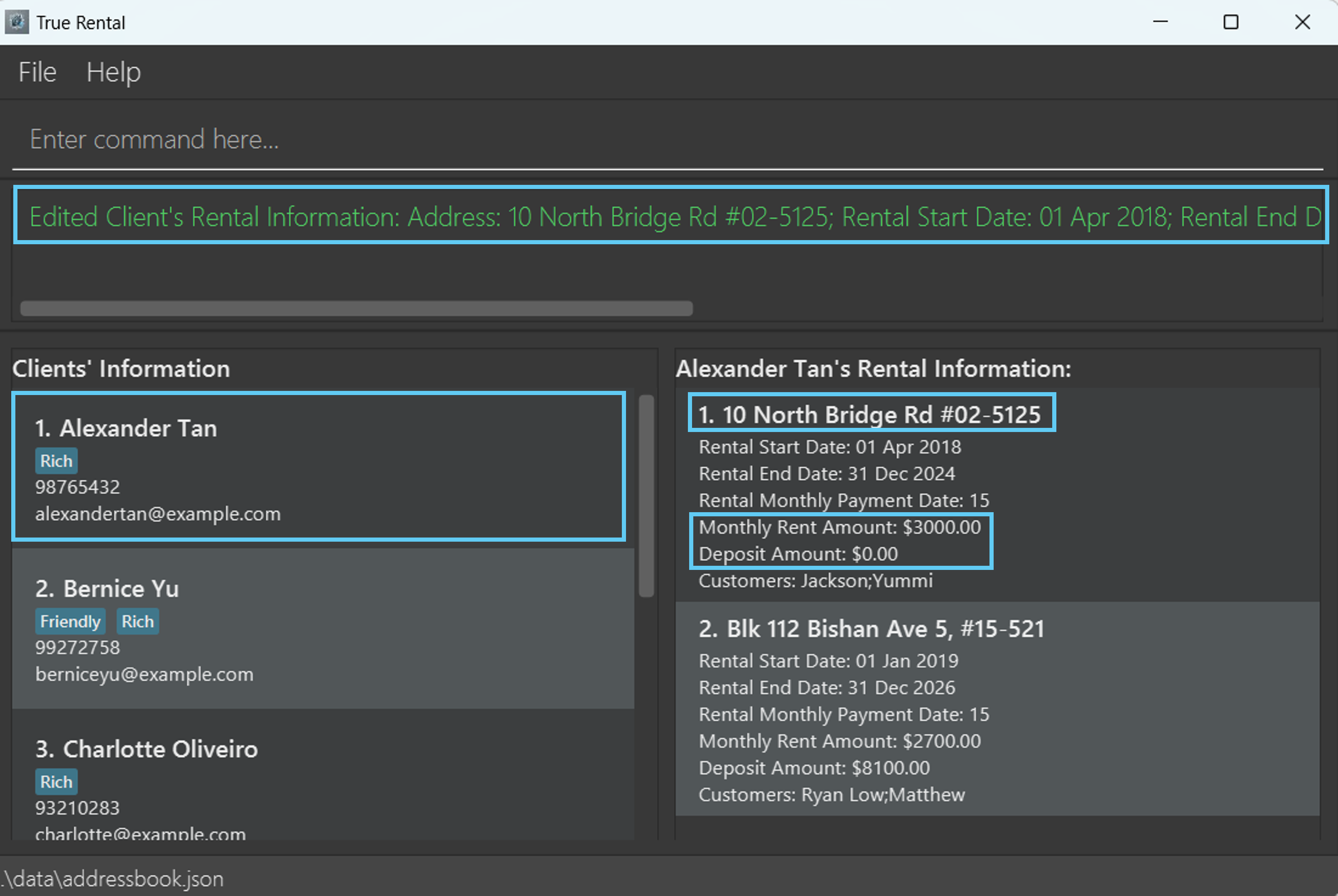
Edits a specific client's rental information in the address book.
Format: redit CLIENT_INDEX r/RENTAL_INDEX [a/ADDRESS] [s/RENTAL_START_DATE] [e/RENTAL_END_DATE] [dd/RENT_DUE_DATE] [m/MONTHLY_RENT] [d/DEPOSIT] [cl/CUSTOMER_LIST]
Constraints:
- The
CLIENT_INDEXrefers to the index number shown in the displayed client list and must be a positive integer starting from 1. - The
RENTAL_INDEXrefers to the client's rental index number shown in the displayed rental information list ( runrview CLIENT_INDEXto display the rental information list) and must be a positive integer starting from 1.- If you already know the
RENTAL_INDEXof the rental information you want to edit, you can just use it directly in the command without needing to runrview CLIENT_INDEXto check for theRENTAL_INDEX.
- If you already know the
- You cannot and should not edit the value of
ADDRESSto be empty, as it is required to not be empty. - Editing a parameter will remove its existing value and replace with the newly specified value.
Tip:
- You can remove the value of existing rental start date, rental end date, rent due date, monthly rent, deposit or
customer list of the specified rental information by providing an empty value after
s/,e/,dd/,m/,d/orcl/respectively.
Example inputs:
redit 1 r/1 a/10 North Bridge Rd #02-5125 m/3000 d/0redit 1 r/2 e/31/12/2024 dd/1 cl/Alice;Bobredit 3 r/1 s/01/01/2025 e/ d/12000 cl/Tan Eng Heng
Example outputs:
Edited Client's Rental Information: Address: 10 North Bridge Rd #02-5125; Rental Start Date: 01 Apr 2018; Rental End Date: 31 Dec 2024; Rent Due Date: 15; Monthly Rent: $3000.00; Deposit: $0.00; Customer List: Jackson;YummiEdited Client's Rental Information: Address: Blk 112 Bishan Ave 5, #15-521; Rental Start Date: 01 Jan 2019; Rental End Date: 31 Dec 2024; Rent Due Date: 1; Monthly Rent: $2700.00; Deposit: $8100.00; Customer List: Alice;BobEdited Client's Rental Information: Address: Blk 8 Hougang Ave 10, #11-2411; Rental Start Date: 01 Jan 2025; Rental End Date: —; Rent Due Date: 15; Monthly Rent: $1500.00; Deposit: $12000.00; Customer List: Tan Eng Heng
Locating clients: find
Finds clients whose names contain any of the given keywords, name, email, phone or tag.
Format: find [k/KEYWORD...] [n/NAME...] [p/PHONE_NUMBER...] [e/EMAIL...] [t/TAG...]
Constraints: Must contain at least one of the optional fields.
Note: Utilising KEYWORD will perform a search for clients whose details include the keyword. Clients are matched
if any of their fields contains the keyword, including rental information details (E.g. name, email, address, etc.).
Tips:
- The search is case-insensitive. e.g
hanswill matchHans. - For
[k/KEYWORD],[n/NAME],[p/PHONE_NUMBER]and[e/EMAIL], partial input will be matched with any of the fields, if any.
E.g.Hanwill matchHans - Tags (
[t/TAG]) will match exactly.
E.g.t/Friendwill only match with the tagFriend, notFriendsorMyBestFriend. - Clients matching at least one keyword will be returned (i.e.
ORsearch).
E.g.k/Hans k/Bowill returnHans Gruber,Bo Yang`
Example inputs:
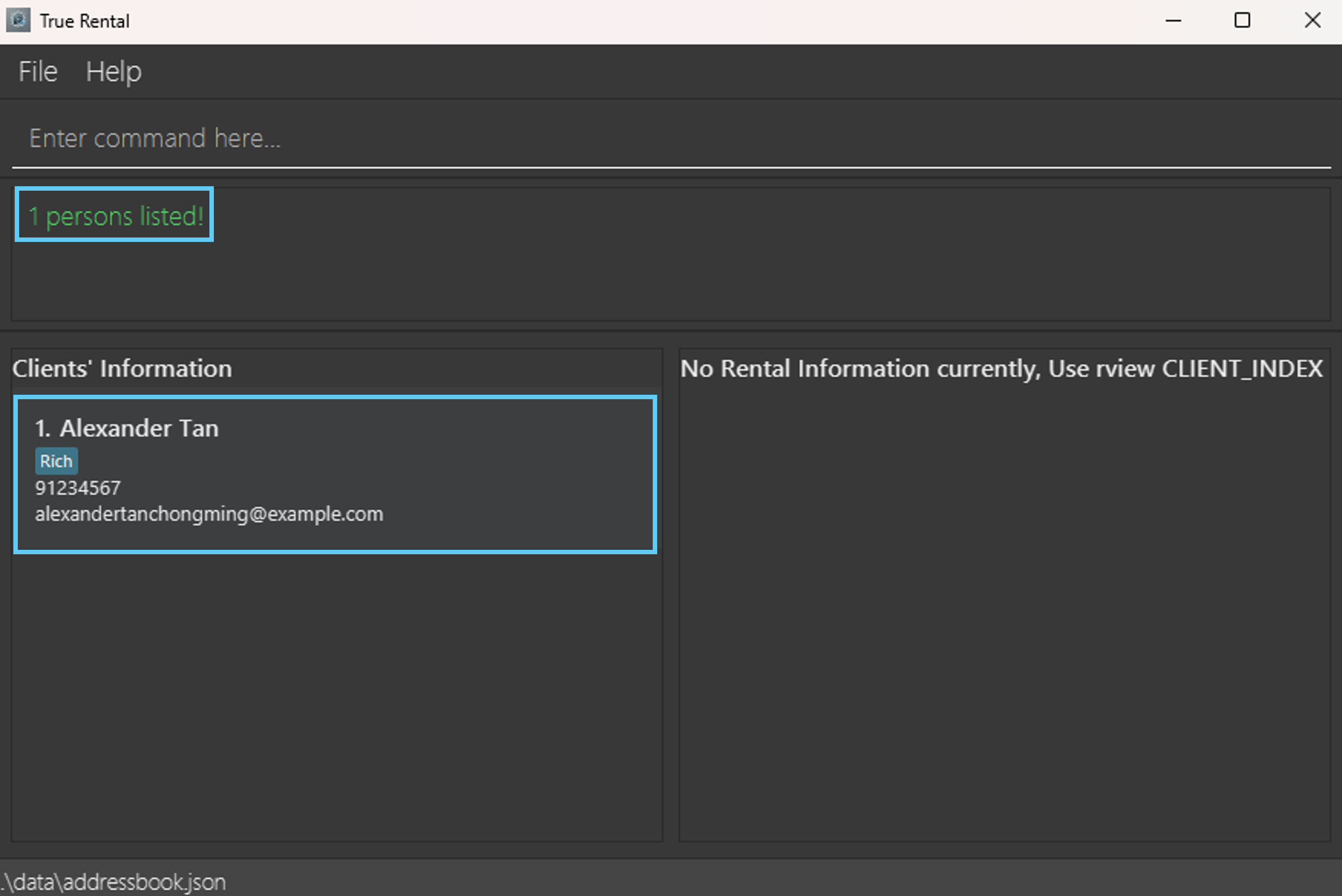
find n/Alex, finds any client whose name contains the wordAlex.find k/12, finds any client whose details contain12.find t/Rich, finds any client with the matching tagRich.
Example outputs:
1 persons listed!. It will return every client whose name containsAlex.2 persons listed!. It will return every client whose details contain12.3 persons listed!. It will return every client with the tagRich.
Deleting a client : cdelete
Deletes the specified client from TrueRental.
Format: cdelete CLIENT_INDEX
Note:
- Confirmation required. Type
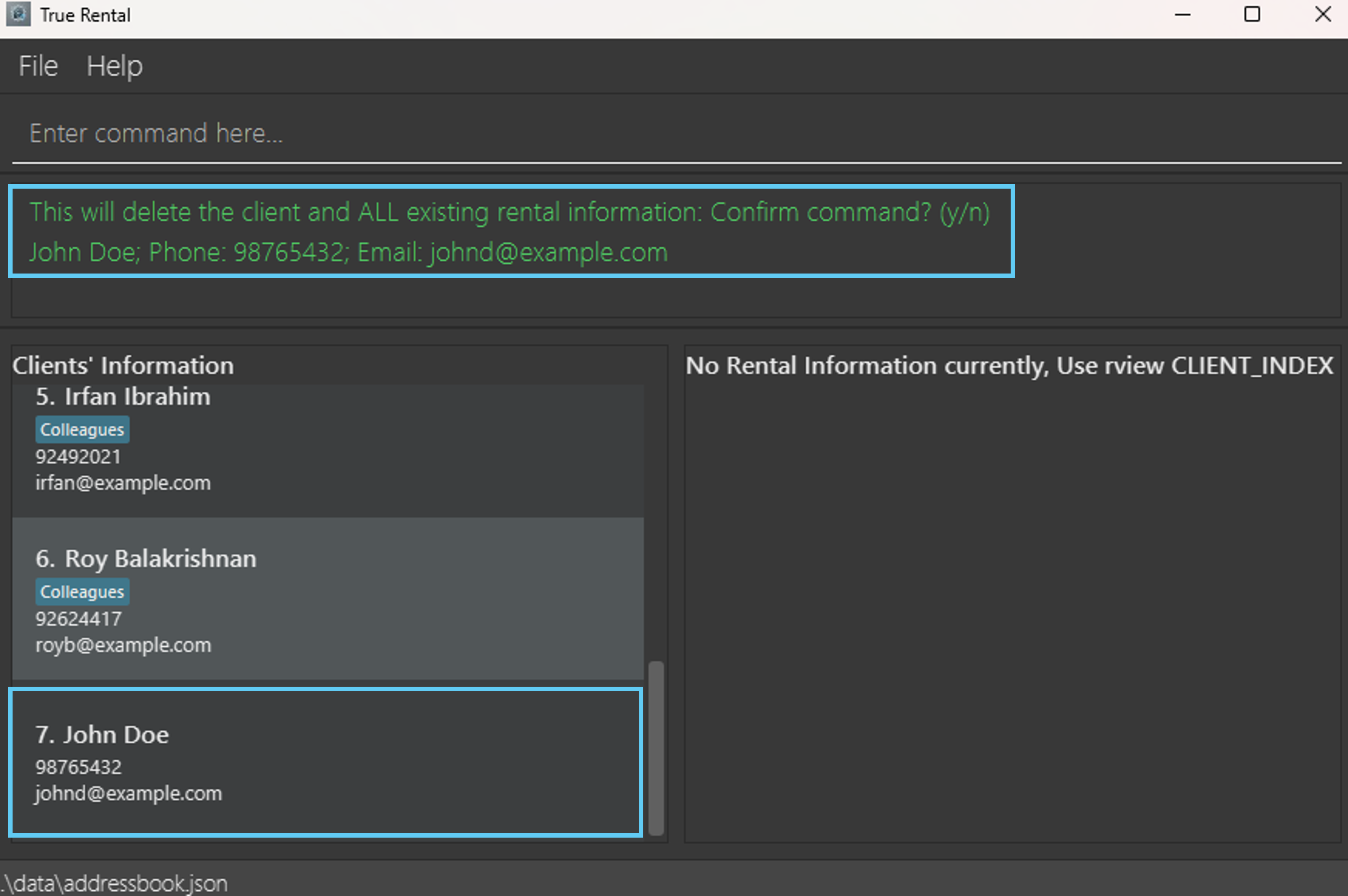
yfor yes, any other input will result in a cancellation. - Deletes the client at the specified
CLIENT_INDEXand all related rental information. - The index refers to the index number shown in the displayed client list.
- The index must be a positive integer starting from 1.
Example inputs::
cdelete 7to delete the client at index 7.yto confirm deletion of the 7th client in the list.
Example outputs:
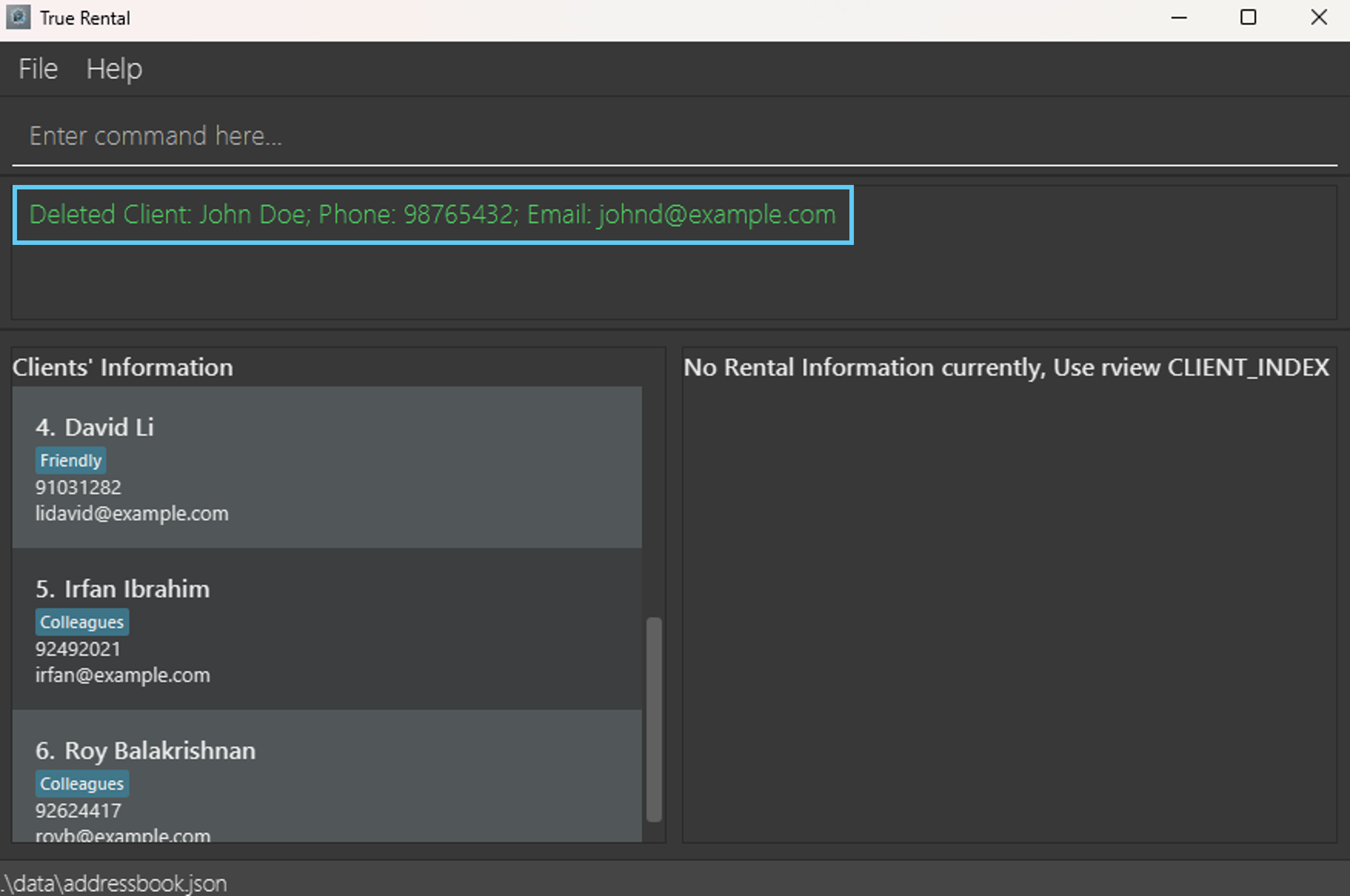
Deleted Client: John Doe; Phone: 98765432; Email: johnd@example.com
Deleting a rental information : rdelete
Deletes the specified rental information from the specified client
Format: rdelete c/CLIENT_INDEX r/RENTAL_INDEX
Note:
- Confirmation required. Type
yfor yes, any other input will result in a cancellation. - Deletes the rental information at the specified
RENTAL_INDEXfrom the client at the specifiedCLIENT_INDEX. CLIENT_INDEXrefers to the index number shown in the displayed client list.RENTAL_INDEXrefers to the index number shown in the displayed rental information list when therviewcommand is run. (i.e.rview CLIENT_INDEX)CLIENT_INDEXandRENTAL_INDEXmust be positive integer starting from 1.
Examples:
listfollowed byrdelete c/2 r/1deletes the 1st rental information from the 2nd client in the address book.find Betsyfollowed byrdelete c/1 r/2deletes the 2nd rental information from the 1st client in the results of thefindcommand.
Sorting all entries : sort
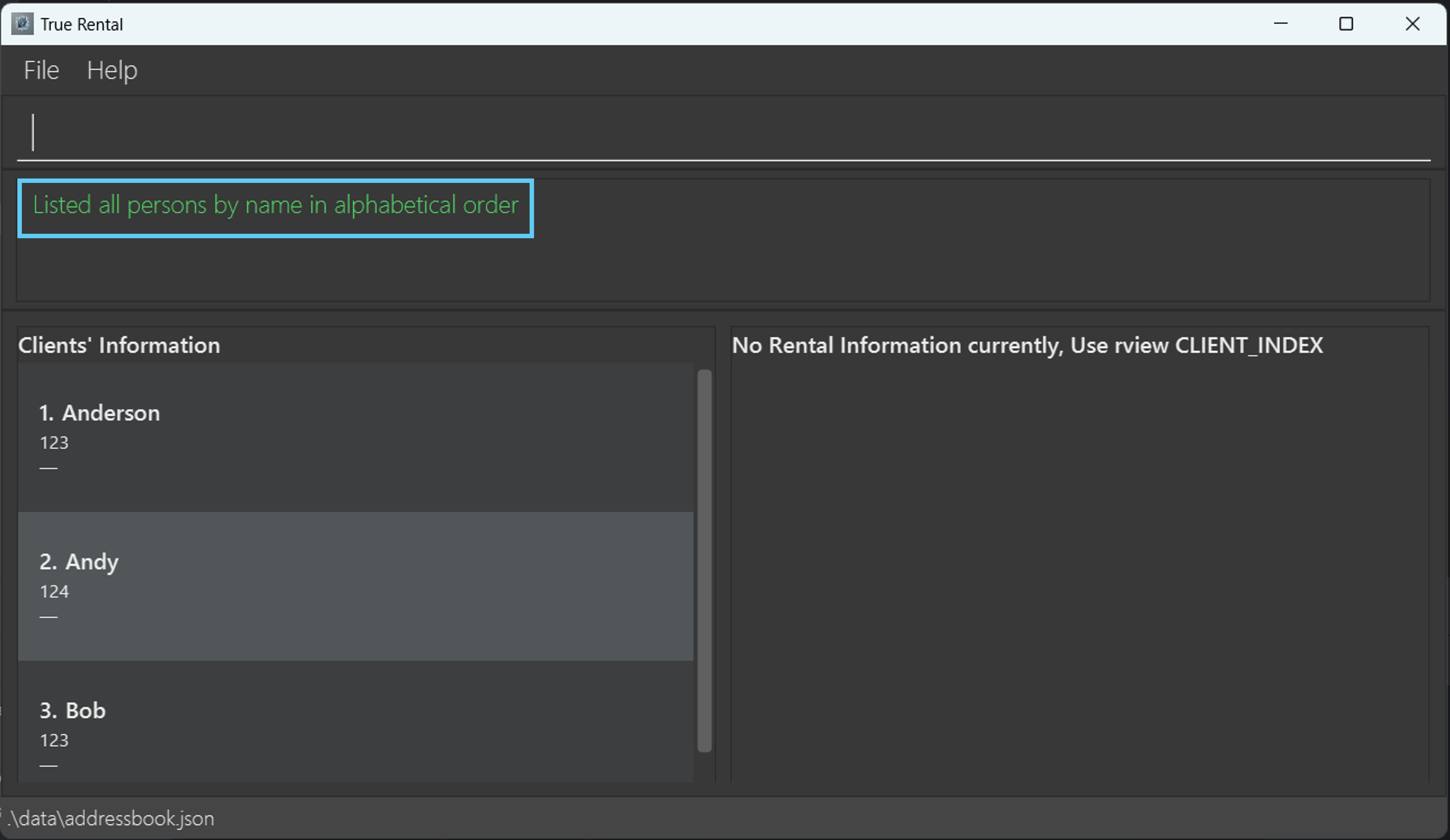
Sorts all entries in the application according to name in alphabetical order.
Format: sort
Command History: ↑ up-arrow key and ↓ down-arrow key
Navigates through all previously entered commands.
- Entering the
↑ up-arrow keywill revisit the previous command in the command history. - Entering the
↓ down-arrow keywill revisit the next command in the command history.
Constraints:
- If there are no more previous commands, it will display the last command within the command history in the command box.
- If there are no more next commands, it will display an empty command in the command box.
Note:
- All commands within the command history will be cleared upon exiting the TrueRental application.
- Only TrueRental specific commands will be stored within the command history.
Example Set-up: (Steps 1 to 6 are performed sequentially)
Please set up the following commands before proceeding with the example inputs and outputs.
cadd n/John Doe p/99887766 e/johndoe@example.comradd 1 a/BLK 1 Bishan s/01/01/2024 e/31/12/2024 dd/15 m/2700 d/8100 cl/Steven;Davidcadd n/Amy Tan p/99887766rview 1listcdelete 2
Example Inputs: (Steps 1 to 13 are performed sequentially)
- Press
↑ up-arrow keyon the keyboard. - Press
↑ up-arrow keyon the keyboard. - Press
↑ up-arrow keyon the keyboard. - Press
↑ up-arrow keyon the keyboard. - Press
↑ up-arrow keyon the keyboard. - Press
↑ up-arrow keyon the keyboard. - Press
↑ up-arrow keyon the keyboard. - Press
↓ down-arrow keyon the keyboard. - Press
↓ down-arrow keyon the keyboard. - Press
↓ down-arrow keyon the keyboard. - Press
↓ down-arrow keyon the keyboard. - Press
↓ down-arrow keyon the keyboard. - Press
↓ down-arrow keyon the keyboard.
Example Outputs: (Steps 1 to 13 are performed sequentially)
- Expected:
cdelete 2is shown in the command box. - Expected:
listis shown in the command box. - Expected:
rview 1is shown in the command box. - Expected:
cadd n/Amy Tan p/99887766is shown in the command box. - Expected:
radd 1 a/BLK 1 Bishan s/01/01/2024 e/31/12/2024 dd/15 m/2700 d/8100 cl/Steven;Davidis shown in the command box. - Expected:
cadd n/John Doe p/99887766 e/johndoe@example.comis shown in the command box. - Expected:
cadd n/John Doe p/99887766 e/johndoe@example.comis still shown in the command box, because there are no more previous commands. - Expected:
radd 1 a/BLK 1 Bishan s/01/01/2024 e/31/12/2024 dd/15 m/2700 d/8100 cl/Steven;Davidis shown in the command box. - Expected:
cadd n/Amy Tan p/99887766is shown in the command box. - Expected:
rview 1is shown in the command box. - Expected:
listis shown in the command box. - Expected:
cdelete 2is shown in the command box. - Expected: : Nothing is shown in the command box.
Autofill: ↹ Tab key
Autofills command name, prefix and value for prefix.
Entering the ↹ Tab key will help to fill or append to the command input with appropriate value.
Constraints:
- The available value for autofill depends on the helping words specified by TrueRental (please refer to the List of helping words after Note for all available helping words).
- Autofill is not customized for every single prefix, all prefixes will have same set of value for autofill.
Note:
- You should not rely on autofill too much as this feature is meant to provide some simple helps only, may not be fully accurate.
- Autofill only help you to get "started" with typing.
- Autofill for prefix is not fully customized for each command, it may have extra prefix that is not used by the command.
- Autofill for prefix may not be working for some commands which does not require extra parameters such as
list, or command that does not need prefix such ascdelete.
List of helping words (separated by comma (,)):
- For autofills for command name:
- cadd, cdelete, cedit, clear, exit, export, find, help, import, list, radd, redit, rdelete, rview, sort.
- For autofills for prefix:
- e/, n/, p/, k/, t/, a/, cl/, d/, dd/, e/, m/, s/, c/, r/.
- For autofills for value for prefix:
- Block, Blk, Ave, Avenue, Tan, Lim, Lee, Ng, Ong, Wong, Goh, Chua, Chan, Koh, Teo, Ang, Yeo, Tay, Ho, Low, Toh, Sim, Chong, Chia, Seah, Sarah, Sofia, Sofea, Sophia, Hana, Hannah, Alyssa, Emily, Emma, Charlotte, Chloe, Alesha, Alicia, Amanda, Sofie, Sophie, Elizabeth, Natalie, Aisyah, Aishah, Olivia, Leia, Keira, Kiera, Haley, Haily, Megan, Ethan, Aden, Aiden, Aidan, Eden, Nathan, Nathaniel, Lucas, Isaac, Caleb, Evan, Matthew, Josh, Joshua, Adam, Asher, Jayden, Rayyan, Julian, Julien, Ian, Cayden, Kayden, Luke, Matthias, Matthew, George, Gabriel, Winston, block, BLOCK, BLK, AVE, AVENUE, Steven, David, Rayan, Ryan.
Example Inputs: (Steps 1 to 12 are performed sequentially)
- Enter
ras the input command. - Press
↹ Tab keyon the keyboard. - Press
↹ Tab keyon the keyboard. - Press
↹ Tab keyon the keyboard. - Clear input command and enter
raddas the input command (take note of the white space at the end of the command input). - Press
↹ Tab keyon the keyboard. - Press
↹ Tab keyon the keyboard. - Press
↹ Tab keyon the keyboard. - Clear input command and enter
radd cl/Jas the input command. - Press
↹ Tab keyon the keyboard. - Press
↹ Tab keyon the keyboard. - Press
↹ Tab keyon the keyboard.
Example Outputs: (Steps 1 to 12 are performed sequentially)
- Value of the input command is now
r. - Value of the input command is now
radd. - Value of the input command is now
redit. - Value of the input command is now
rdelete. - Value of the input command is now
radd. - Value of the input command is now
radd a/. - Value of the input command is now
radd cl/. - Value of the input command is now
radd d/. - Value of the input command is now
radd cl/J. - Value of the input command is now
radd cl/Josh. - Value of the input command is now
radd cl/Joshua. - Value of the input command is now
radd cl/Jayden.
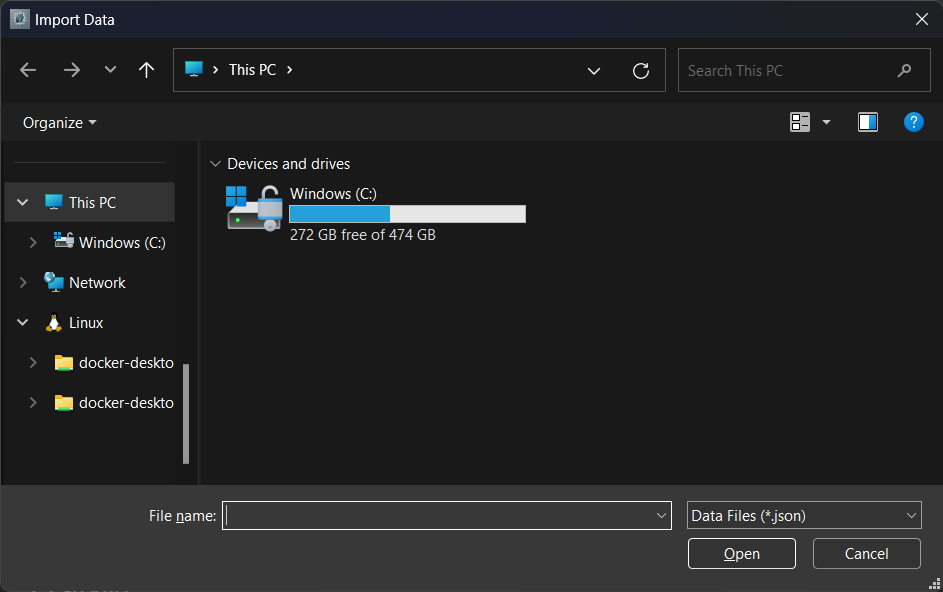
Importing data: import
Imports and overwrite all existing data from a .json file.
Format: import
Constraints:
- Only
.jsonfiles can be imported. - The chosen file must have the correct format.
- The correct format is the same as the data file of the app. Visit our Developer Guide for more details.
Note:
- Importing data will delete all current data in the address book. It is recommended to back up the current data via
the
exportcommand. - Confirmation required. Type
yfor yes, any other input will result in a cancellation. - A new window will be opened that prompts for a file.
Exporting data: export
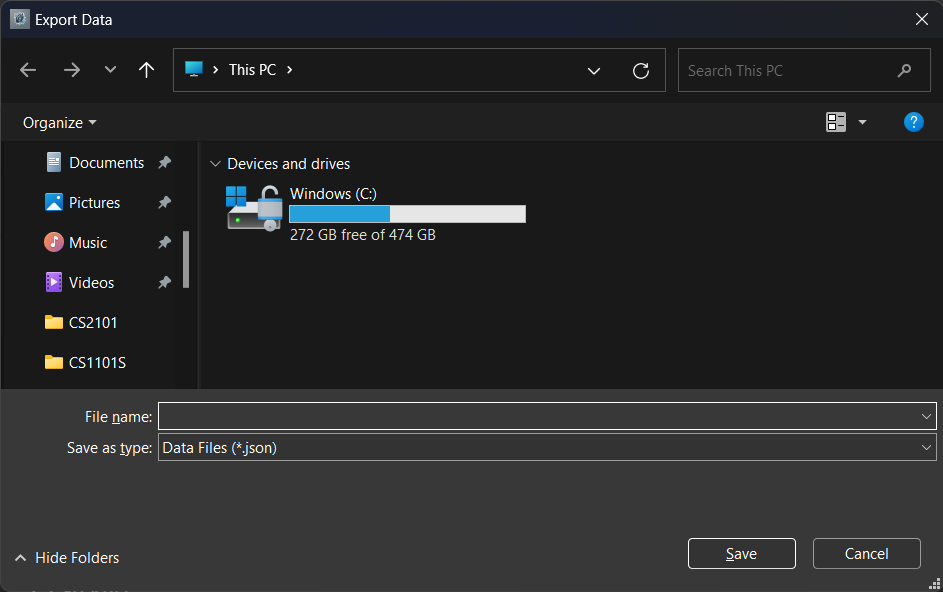
Exports all data within TrueRental into a .json file.
Format: export
Note:
- Address book data can only be exported as
.jsonfiles. - A new window will be opened that prompts for a file.
Clearing all entries : clear
Clears all entries from TrueRental.
Format: clear
Note: Confirmation required. Type y for yes, any other input will result in a cancellation.
Exiting the application : exit
Exits the program.
Format: exit
Saving the data
TrueRental data are saved in the hard disk automatically after any command that changes the data. There is no need to save manually.
Editing the data file
TrueRental data are saved automatically as a JSON file [JAR file location]/data/addressbook.json. Advanced users are
welcome to update data directly by editing that data file.
Caution:
If your changes to the data file makes its format invalid, TrueRental will discard all data and start with an empty
data file at the next run. Hence, it is recommended to take a backup of the file before editing it.
Furthermore, certain edits can cause the TrueRental to behave in unexpected ways (E.g. if a value entered is outside
the acceptable range). Therefore, edit the data file only if you are confident that you can update it correctly.
FAQ
Q: How do I transfer my data to another computer?
A: Export the data file in the current computer with the export command. Install the app in the other computer
and use the import command to import the data file that you previously exported.
Known issues
- When using multiple screens, if you move the application to a secondary screen, and later switch to using only the primary screen, the GUI will open off-screen. The remedy is to delete the
preferences.jsonfile created by the application before running the application again. - If you minimize the Help Window and then run the
helpcommand (or use theHelpmenu, or the keyboard shortcutF1) again, the original Help Window will remain minimized, and no new Help Window will appear. The remedy is to manually restore the minimized Help Window. - The commands are not case-insensitive. The remedy is to ensure that all commands are either capitalised or not capitalised.
- Current error message for invalid value of
MONTHLY_RENTandDEPOSITis not precise enough (we use the termnumbers). Please follow Parameter Constraints Table for valid values. - Current error message for invalid value of
CUSTOMER_LISTis not precise enough (we only mention you should separate the names by ; if there is more than one customer). Please follow Parameter Constraints Table for valid values. - If a parameter value is too long, it will not display fully in the application. The excess characters will be cut off and replace by
.... You should not provide a value that is too long to avoid this issue. - The error message of
importandexportis displayed with a green color, which may be confusing for users. - The error message displayed when
importorexportfails is quite vague ("The chosen file may be corrupted"). We will be refining this error message in the future to give more feedback about what went wrong (duplicate clients, missing field, etc.) - The message for confirmation prompts state
y/n, which implies you can only usento cancel the command. However, any input other thany/yesleads to cancellation. - The message displayed when a command is cancelled has green color, which may be confusing for users.
- An error occurs in the background when you first launch TrueRental, due to the absence of the
CommandHistorystorage file. The file will subsequently be created after the user enters his/her firstTrueRental'scommand. This will not hinder your experience.
Glossary
Extraneous: Not directly related connected with or related to something.
Client: A landlord whose properties are managed by you (a letting agent).
Letting agent: An individual that facilitates agreements between tenants and landlords to rent properties.
Customer list: The list of tenant(s) who are renting a property.
Rent due date: The date (
ddindd/mm/yyyy) in each month when monthly rent is collected from tenants. Ranges between1-31, without leading zeros.Command Line Interface (CLI): A means of interacting with a computer program by inputting lines of text.
Graphical User Interface (GUI): A means of interacting with a computer program through visual indicators such as graphical icons, images, videos, etc.
Parameter: A value that defines the behavior of commands. For example,
cdelete 1deletes the first client in the list, whilecdelete 2deletes the second. The numbers1and2are parameters supplied to thecdeletecommand.Parameter option flag: A prefix ending in
/which indicates that what comes after is a specific parameter. For example, in the commandrdelete c/1 r/2, the parameter option flags arec/andr/.c/indicates that the1which comes after is the client index, andr/indicates that the2which comes after is the rental index.Index: The position of a client or rental information in the lists shown in the app, represented by a number.
Domain name: The second part of an email address after
@. For example,gmail.comandoutlook.com.Domain label: The second part of an email address after
@. For example,gmailandoutlook.Home Folder: The folder you saved this application in.
Unicode Characters: Symbols and letters that conform to the Unicode standard. Almost all characters on your keyboard will be valid unicode characters.